Professional Sales Simulation
CASE STUDY
Professional Sale Simulation Complete Process
Designing a Day-in-the-Life Training Experience for Sales Professionals
MY ROLE
Lead Designer
TIMELINE
Three Months
TEAM
Designer, product manager, and two engineers
KEY FACTOR
Dashboard Design
Product Background
The Professional Sales Simulation, developed by Stukent, is an interactive learning experience designed to help both new and experienced sales professionals strengthen their skills in communication, decision-making, and time management.
The simulation places students in the role of a sales representative and asks them to manage a realistic workday that includes scheduling tasks, making outbound calls, responding to dynamic customer scenarios, and reviewing performance results.
The Challenge
The challenge was designing an experience that captures the complexity of a real sales workflow while remaining intuitive and educational for learners. The simulation needed to balance realism with clarity so students could focus on learning rather than navigating a complicated interface.
As the lead UX designer, I was responsible for transforming an early product concept into a structured, intuitive simulation. I collaborated with product managers, instructional designers, and engineers to define requirements, validate learning objectives, design the interaction flow, and deliver a cohesive user experience.
Key Problems Identified
Complex Workflow Simulation
Replicating the daily responsibilities of a sales representative required coordinating multiple activities within a single experience.
Time Management Challenges
Sales professionals must prioritize tasks effectively, but learners often struggled to understand how to manage time within the simulation.
Realistic Customer Interactions
Sales conversations needed to feel authentic while still providing clear learning opportunities.
Need for Meaningful Feedback
Users required clear insights into how their decisions and time allocation affected their sales performance.
Research and Discovery
To better understand real-world sales workflows, I conducted qualitative research and collaborated with sales subject matter experts.
Reviewing software tools used by professional sales representatives
Studying competitor simulations and training platforms
Conducting feedback sessions with users to understand learning challenges
The research revealed two key insights:
Students frequently struggle with prioritization and time management, especially when balancing multiple responsibilities.
Users value clear feedback that directly connects their actions to performance outcomes.
These findings strongly influenced the design of both the schedule management interface and the performance dashboard.

Design Process
STEP ONE
Low-Fidelity Exploration
I began by sketching early concepts and translating them into low-fidelity wireframes focused on validating the core interaction model.
How users would plan and manage their daily schedule
How call interactions would unfold
Where decision-making scenarios would appear in the workflow
How users would transition from the simulation to the results dashboard
The low-fidelity wireframes helped ensure the overall experience remained structured and easy to follow.
STEP TWO
High-Fidelity Exploration
After validating the core structure, I created high-fidelity designs that refined the visual hierarchy and interaction patterns.
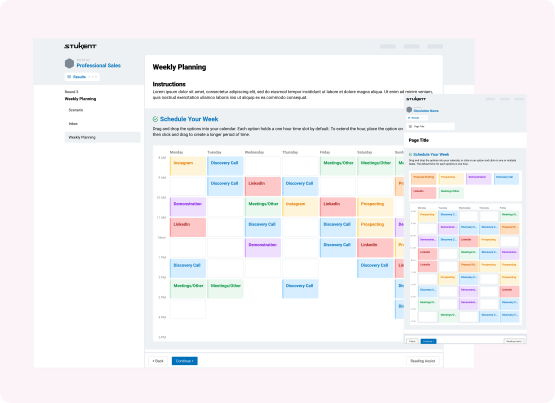
A clean schedule interface that clearly displays daily priorities
Structured prompts that guide users through customer interactions
Clear visual cues showing progress throughout the simulation
Intuitive layouts that reduce cognitive load during decision-making
These refinements helped create a more polished and engaging learning environment.
STEP THREE
Prototyping
To evaluate the full experience, I developed interactive prototypes that simulated the flow of a sales representative’s workday.
Managing tasks within the sales calendar
Navigating call interactions and branching scenarios
Transitioning to the performance dashboard
Testing helped confirm that the simulation effectively mirrored real-world sales workflows while remaining approachable for learners.
Key Features and Solutions
Timeline-Based Schedule Interface
A clean, visual schedule allows students to prioritize tasks and manage their day effectively.
Dynamic Call Interactions
Sales conversations unfold through branching choices that simulate real customer responses.
Decision-Based Scenarios
Students encounter realistic situations requiring strategic decisions that affect outcomes.
Performance Dashboard
A results dashboard summarizes call success rate, time allocation, and decision outcomes.
Actionable Feedback
Users receive clear insights explaining how their decisions impacted performance and how they can improve.
Impact, Results, and Key Learning
The final simulation delivers a realistic and engaging training experience that mirrors the daily workflow of a professional sales representative.
This project reinforced the importance of designing systems that reflect real-world workflows while still remaining approachable for learners. By structuring the simulation around a familiar daily schedule, users were able to understand how their decisions affected the overall outcome of their workday.
The project also demonstrated the value of linking user actions directly to performance feedback, which helps learners better understand how their choices influence results.
Close collaboration with subject matter experts ensured the experience remained both realistic and educationally effective.
Helps learners practice prioritization and time management
Simulates real-world sales conversations through branching interactions
Provides actionable insights through a clear performance dashboard
Builds user confidence by allowing experimentation in a safe environment